Database-powered · FUSE · PITR

aifs
A time-machine filesystem

Your Files, Protected Forever. Every change recorded, every deletion recoverable, nothing lost.

In the AI Agent era, agents autonomously read, write, and modify files at scale. aifs turns your filesystem into a time machine. Rewind to any moment, recover deleted files, and let agents work fearlessly. Store your code and agent sessions on aifs — pick up exactly where you left off, from any machine.

Whether you're a researcher, engineer, lawyer, teacher, or student — use aifs to protect your most important data. Every change to every file is precisely recorded and recoverable. Never worry about accidental deletion again. aifs aims to be essential software on every personal computer in the world, making data protection as simple, reliable, and accessible as possible.

🐧 Linux 🍎 macOS 🪟 Windows

🖥️ GUI app — designed for daily office use. Protect your files with a simple, intuitive interface. Zero learning curve.

⌨️ CLI tool — built for advanced users and automation. Mount/storage separation, cloud remote mount, scripting, and more.

✅ Great for ❌ Not ideal for
AI agent work directories Large media files (video, database dumps)
Code repositories High-IO frequent reads/writes
Documents & presentations Compiling large projects
Research papers, configuration files
Get Started View on GitHub
aifs quick start (CLI)
# 1. Initialize global config
$ aifs config init --base-dir /aifs
[OK] config saved
# 2. Create a project instance
$ aifs create -i my-project
[OK] instance "my-project" created
# 3. Start database + backup containers
$ aifs start -i my-project
$ aifs status -i my-project
[OK] database accepting connections
# 4. Format filesystem & mount
$ aifs format -i my-project
$ aifs mount -i my-project ~/mnt -d
[OK] background mount pid 12345 at ~/mnt
# 5. Snapshot before risky work
$ aifs snapshot create -i my-project --type full
[OK] snapshot 20260626-083000F created
# Start your project, agent does work... something goes wrong
# 6. Unmount → restore → remount
$ aifs umount ~/mnt
$ aifs restore -i my-project --time "2026-06-26 08:30:00" --promote
$ aifs mount -i my-project ~/mnt -d
[OK] filesystem restored ✓ nothing lost
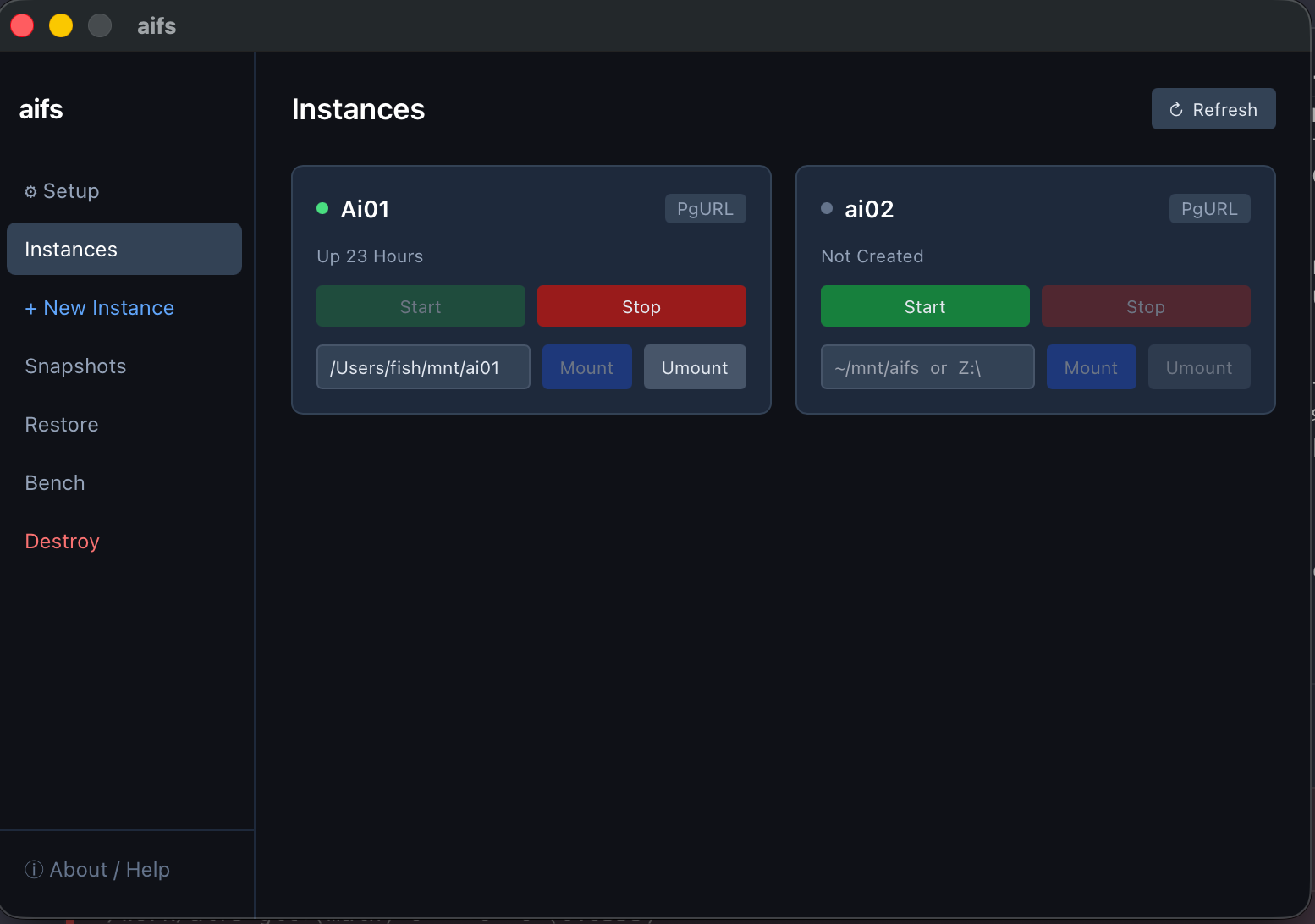
aifs GUI (macOS)
aifs GUI on macOS
Core capabilities
Built for the age of autonomous agents

Everything you need to make file operations reliable, reversible, and observable.

⏱️

Point-in-Time Recovery

PostgreSQL WAL-based PITR lets you rewind the entire filesystem to any timestamp — seconds, hours, or weeks ago.

📸

Instant Snapshots

Full, differential, and incremental backups. Take a snapshot before any risky operation, delete old ones to reclaim storage.

🌐

Remote Cloud Database URL

Mount any remote PostgreSQL database directly with --url. Connect to AWS RDS, Supabase, Neon, or any cloud Postgres — no local containers needed.

🔗

Shared Multi-machine Access

Same database, multiple machines. Mount the same filesystem on Linux, macOS, and Windows simultaneously — PostgreSQL handles concurrency.

🖥️

Cross-platform

Native FUSE on Linux and macOS. WinFsp drive-letter mounts on Windows (Z:, X:, etc.). One binary, one config.

📦

Zero-dependency deploy

aifs manages its own PostgreSQL and backup containers via Podman. No server setup, no DBA required.

🐘

Multi-instance PostgreSQL Manager

Beyond a filesystem — aifs is also a lightweight, single-machine multi-instance PostgreSQL management tool. Spin up an IO-optimized PG 18 instance with full WAL streaming and PITR backup/recovery in under 10 seconds. Run multiple independent instances side by side, each with its own port, data directory, and backup policy.

🤖

AI Agent Session Storage

Store your AI agent sessions — ~/.claude, ~/.codex and more — on a remote aifs instance or cloud PostgreSQL. Mount from home, office, or anywhere. Your context follows you.

Workflow
How it works

A filesystem backed entirely by PostgreSQL — simple to deploy, powerful to recover.

1

Create & Start

Spin up a PostgreSQL container with aifs create + aifs start.

2

Format & Mount

Initialize the filesystem with aifs format, then mount it as a local drive.

3

Snapshot

Take a full snapshot before risky work. aifs handles WAL archiving continuously.

4

Restore anytime

Rewind to any timestamp. Inspect read-only, then promote back to read-write when ready.

Get started
Install and upgrade in one command

Pre-built binaries for Linux, macOS, and Windows. Installation and upgrade use the same command.

curl -fsSL https://raw.githubusercontent.com/mars-base/aifs/main/scripts/install.sh | sh

⚠️ Run the following commands in PowerShell (not CMD)

Prepare the Windows runtime environment — run once before installing:

irm https://raw.githubusercontent.com/mars-base/aifs/main/scripts/aifs-setup.ps1 | iex

Then install aifs:

irm https://raw.githubusercontent.com/mars-base/aifs/main/scripts/install.ps1 | iex
Multi-machine
Shared storage, zero infrastructure

Mount the same PostgreSQL-backed filesystem on multiple machines simultaneously.

One database, many machines

Because all filesystem state lives in PostgreSQL, any machine with network access can mount the same database. Use a local aifs instance as the backend, or connect directly to a cloud PostgreSQL service.

Perfect for teams sharing a data archive, AI agents running across multiple nodes, or anyone who needs the same files accessible from different locations.

AWS RDS Supabase Neon Self-hosted aifs instance
--url mount
# One-time format
$ aifs format \
  --url "postgresql://user:pass@db.example.com:5432/archive"
 
# Machine A (Linux)
$ aifs mount ~/archive -d \
  --url "postgresql://..."
 
# Machine B (Windows)
> aifs mount Z: -d \
  --url "postgresql://..."
 
# Both see the same files
$ aifs mount -l
/home/user/archive